This is the final project for Course 8, Python Project for Data Visualization. Part of IBM's Data Analyst Professional Certificate from Coursera. Available here: https://www.coursera.org/programs/jda20232t1-z1hse/professional-certificates/ibm-data-analyst?collectionId=Wxyxq
For part one of this project, we are to create data visualizations. The objective of this part is to analyze and visualize the wildfire activities in Australia using the provided dataset. We will explore patterns and trends, and create visualizations to gain insights into the behavior of wildfires in different regions of Australia.
For the second part, we are creating and customizing dashboards. The objective of this part is to create dashboards to contain our plots and charts. We will create a dashboard wherein the user can select the Region and the Year. Based on the selection, the dashboard will display the following two charts:
- Pie Chart on Monthly Average Estimated Fire Area
- Bar Chart on Monthly Average Count of Pixels for Presumed Vegetation Fires
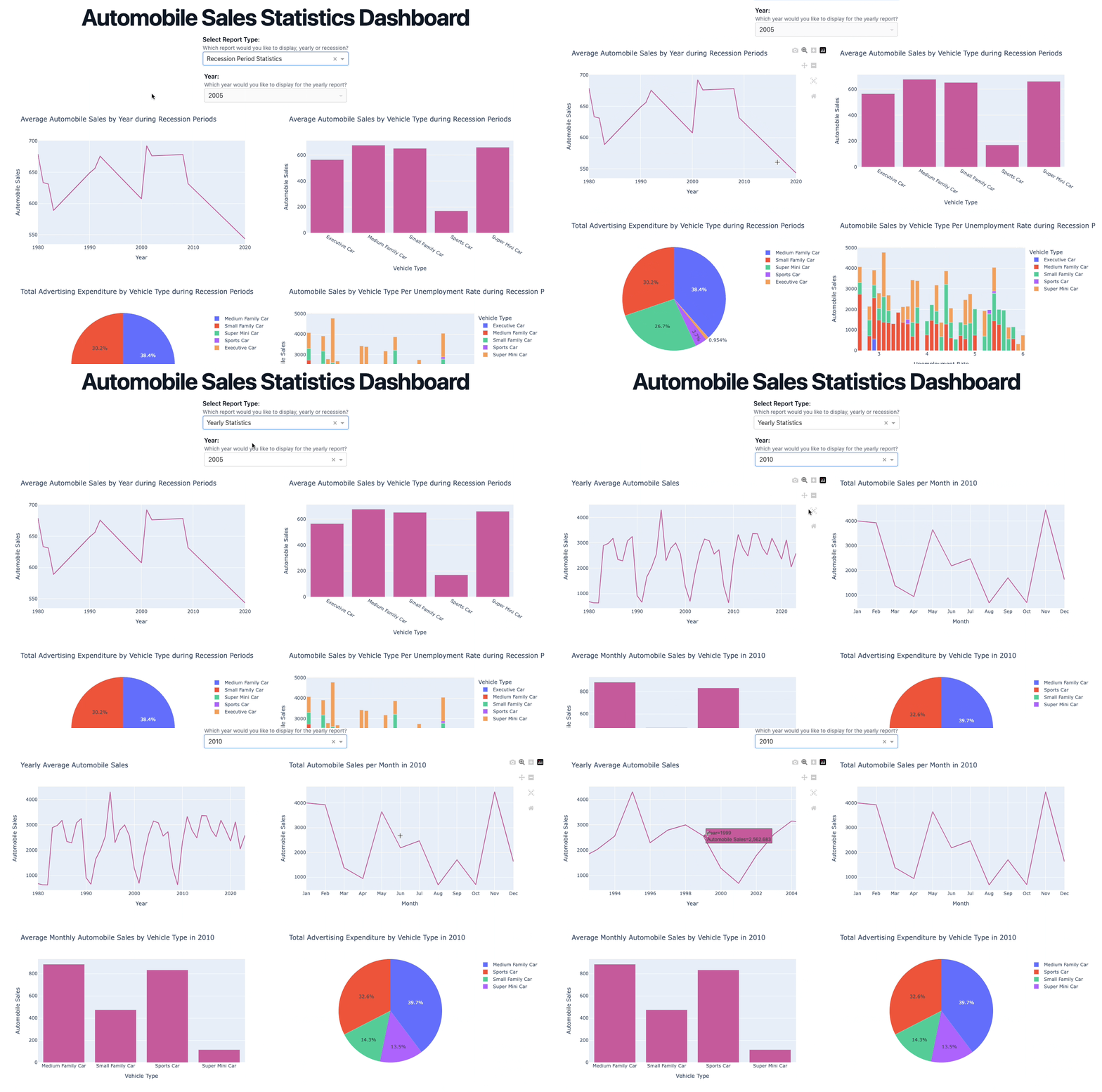
For the final part, we are assuming the role of a data scientist at XYZAutomotives. Our first task is to analyze the historical data and give the company directors insights on how the sales were affected during times of recession. We will provide a number of charts/plots to visualize the data and make it easy for the directors to understand our analysis. By examining various factors mentioned from the dataset, we aim to gain insights into how recessions impact automobile sales for the company. We will split this part up into two sections, Task 1 and Task 2. The objective of Task 1 is to analyze the historical trends in automobile sales during recession periods. The goal is to provide insights into how the sales of XYZAutomotives, a company specializing in automotive sales, were affected during times of recession. The objective of Task 2 is to create dashboards to contain our plots and charts and to provide the directors with the ability to select a particular report or a period of time so they can discuss the data in detail.
- Data Description
- Tools
- Deliverables
- Stretch Goals
- Dashboard Demo
This wildfire dataset contains data on fire activities in Australia starting from 2005. Additional information can be found here: https://earthdata.nasa.gov/earth-observation-data/near-real-time/firms/c6-mcd14dl?utm_medium=Exinfluencer&utm_source=Exinfluencer&utm_content=000026UJ&utm_term=10006555&utm_id=NA-SkillsNetwork-Channel-SkillsNetworkCoursesIBMSkillsNetworkDV0101ENCoursera2761-2023-01-01.
The dataset includes the following variables:
- Region: the 7 regions
- Date: in UTC and provide the data for 24 hours ahead
- Estimated_fire_area: daily sum of estimated fire area for presumed vegetation fires with a confidence > 75% for each region in km2
- Mean_estimated_fire_brightness: daily mean (by flagged fire pixels(=count)) of estimated fire brightness for presumed vegetation fires with a confidence level > 75% in Kelvin
- Mean_estimated_fire_radiative_power: daily mean of estimated radiative power for presumed vegetation fires with a confidence level > 75% for a given region in megawatts
- Mean_confidence: daily mean of confidence for presumed vegetation fires with a confidence level > 75%
- Std_confidence: standard deviation of estimated fire radiative power in megawatts
- Var_confidence: Variance of estimated fire radiative power in megawatts
- Count: daily numbers of pixels for presumed vegetation fires with a confidence level of larger than 75% for a given region
- Replaced: Indicates with a Y whether the data has been replaced with standard quality data when available (usually with a 2-3 month lag). Replaced data has a slightly higher quality in terms of locations
We will be presented with various questions for analyzing data to understand the historical trends in automobile sales during recession periods. recession period 1 - year 1980 recession period 2 - year 1981 to 1982 recession period 3 - year 1991 recession period 4 - year 2000 to 2001 recession period 5 - year-end 2007 to mid-2009 recession period 6 - year 2020 - Feb to April (Covid-19 Impact) The data used in this lab has been artificially created for this assignment only. No real data has been used.
The dataset includes the following variables:
- Date: The date of the observation.
- Recession: A binary variable indicating a recession period; 1 means recession, 0 means it was normal.
- Automobile_Sales: The number of vehicles sold during the period.
- GDP: The per capita GDP value in USD.
- Unemployment_Rate: The monthly unemployment rate.
- Consumer_Confidence: A synthetic index representing consumer confidence, which can impact consumer spending and automobile purchases.
- Seasonality_Weight: The weight representing the seasonality effect on automobile sales during the period.
- Price: The average vehicle price during the period.
- Advertising_Expenditure: The advertising expenditure of the company.
- Vehicle_Type: The type of vehicles sold; Supperminicar, Smallfamiliycar, Mediumfamilycar, Executivecar, Sports.
- Competition: The measure of competition in the market, such as the number of competitors or market share of major manufacturers.
- Month: Month of the observation extracted from Date.
- Year: Year of the observation extracted from Date.
pythonv3.12.2pandasfor managing the data.numpyfor mathematical operations.seabornfor visualizing the data.matplotlibfor additional plotting tools.foliumfor geospatial data visualization such as choropleth maps.plotlyfor interactive plotting tools.dashfor dashboards.tailwindto style dashboards.
- To understand the change in average estimated fire area over time using pandas to plot the line chart
- To plot the estimated fire area over month
- Use the functionality of seaborn to develop a barplot, to find the insights on the distribution of mean estimated fire brightness across the regions
- Develop a pie chart and find the portion of count of pixels for presumed vegetation fires vary across regions
- Customize the previous pie plot for a better visual representation
- Use Matplotlib to develop a histogram of the mean estimated fire brightness
- Use the functionality of seaborn and pass region as hue, to understand the distribution of estimated fire brightness across regions
- Develop a scatter plot to find the correlation between mean estimated fire radiative power and mean confidence level
- Mark all seven regions affected by wildfires, on the Map of Australia using Folium
- Add title to the dashboard
- Add the radio items and a dropdown right below the first inner division
- Add two empty divisions for output inside the next inner division
- Add the Output and input components inside the app.callback decorator
- Add the callback function
- TASK 1.1: Develop a Line chart using the functionality of pandas to show how automobile sales fluctuate from year to year.
- TASK 1.2: Plot different lines for categories of vehicle type and analyze the trend to answer the question “Is there a noticeable difference in sales trends between different vehicle types during recession periods?”
- TASK 1.3: Use the functionality of Seaborn Library to create a visualization to compare the sales trend per vehicle type for a recession period with a non-recession period.
- TASK 1.4: Use sub plotting to compare the variations in GDP during a recession and non-recession periods by developing line plots for each period.
- TASK 1.5: Develop a Bubble plot to display the impact of seasonality on Automobile Sales.
- TASK 1.6: Use the functionality of Matplotlib to develop a scatter plot to identify the correlation between average vehicle price relate to the sales volume during recessions.
- TASK 1.7: Create a pie chart to display the portion of advertising expenditure of XYZAutomotives during recession and non-recession periods.
- TASK 1.8: Develop a pie chart to display the total Advertisement expenditure for each vehicle type during a recession period.
- TASK 1.9: Develop a line plot to analyze the effect of the unemployment rate on vehicle type and sales during the Recession Period.
- TASK 1.10: Create a map on the hightest sales region/offices of the company during recession period.
The directors of XYZAutomobiles have requested a dashboard to be developed so they can drill into the data in more detail for specific years or by different categories. Our second task is to create a suitable dashboard and add user interactions so that the directors can select the data they want to review without the need to request new plots.
- TASK 2.1: Create a Dash application and give it a meaningful title.
- TASK 2.2: Add drop-down menus to our dashboard with appropriate titles and options.
- TASK 2.3: Add a division for output display with appropriate id and classname property
- TASK 2.4: Creating Callbacks; Define the callback function to update the input container based on the selected statistics and the output container.
- TASK 2.5: Create and display graphs for Recession Report Statistics.
- TASK 2.6: Create and display graphs for Yearly Report Statistics.
- None so far