Conversation


|
What are the dependencies exactly (I tried installing pyimgui but the Lorenz example complains about missing pyimgui unknown backend) |

|
After pulling and recompiling glumpy I was able to get past the error that Rougier encountered. I now get the new error: This happens when attempting to run the Lorenz example on Ubuntu. |
|
@mlviz Do you have an idea what can be wrong on our side? |
|
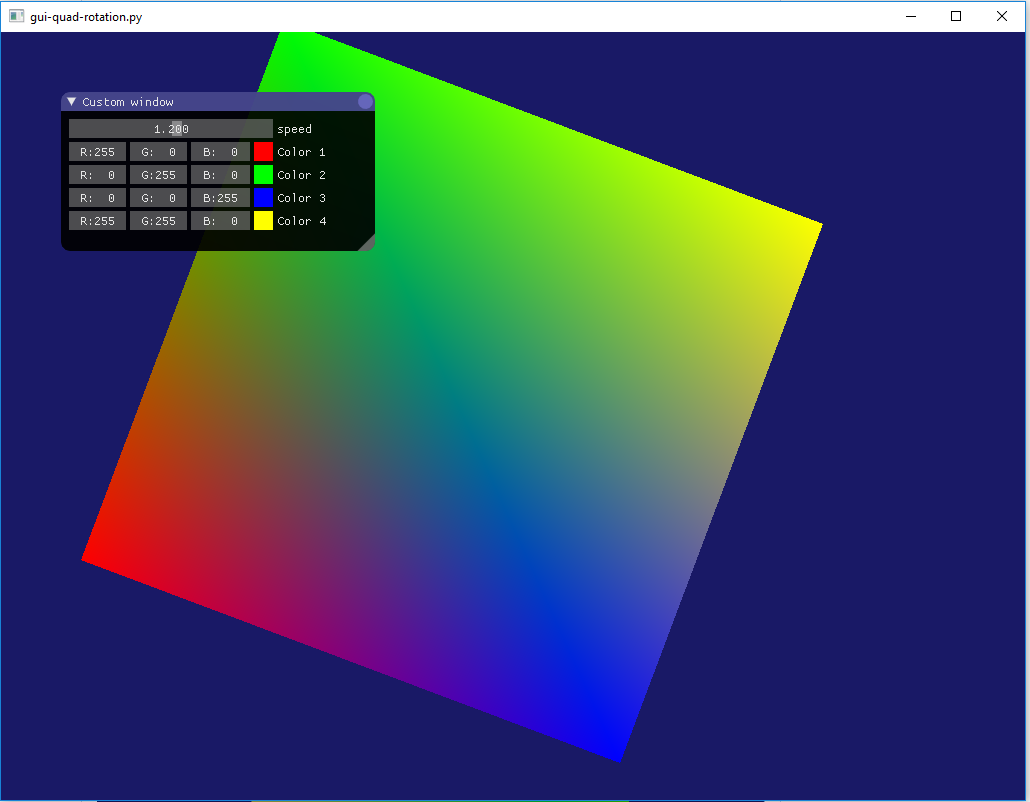
Hi, Sorry I didn't come back sooner, got caught in the holidays. The backend comes from the file glumpy/app/window/backends/backend_pyimgui.py which is part of the pull request. The reason is that pyimgui comes with its opengl glfw window, so I built a backend on top of it based on the backend template. I also added the on_gui event to the backend to make it easier to work with. lines 84-86 of backend_pyimgui.py shows the key dependencies: I would recommend to first install pyimgui with glfw backend: (see https://github.com/swistakm/pyimgui) Then install the pull request version of glumpy which is the pyimgui branch of my mlviz fork: First try examples/pyimgui/gui-quad-rotation.py, it shows how to use the imgui backend: Should give you this: If it does not work, as mentionned in my first comment from dec 2, you might have to adjust some things on external packages:
The screenshot just come from an example I ran on Windows10 using then Anaconda distribution of python 3.7 (also works on 3.6). |
|
Just for reference, here is the adjusted version of opengl.py |
|
Here is the adjusted version of platform.py |
|
Is this viable if we are having to make edits to external libraries? @mlviz |
|
After updating to Python 3.7.2 I have new output. A window appears, but is blank and then crashes. But when I run |
This is a very good question, I am not familiar with what is the best procedure in such case. @dan90210 Do you have a fully functional version of pyimgui with the GLFW backend? |
|
After installing the necessary dependencies I was able to run the glfw3.py example you linked above. After trying that I ran both pyimgui examples that you included and both gave me the same output. This is on Ubuntu with Python 3.7.2 |
|
@dan90210 You have made good progress. We now must validate that your graphic cards and opengl version supports the required features. In the file glumpy/app/window/backends/backend_pyimgui.py at lines 149+ we have: This means that you drivers, and graphic card, that support opengl 3.2 or better, and that your graphic card must also support OPENGL_COMPAT_PROFILE extension. @rougier A possible way to avoid the requirement for OPENGL_COMPAT_PROFILE would be to integrate imgui (https://github.com/ocornut/imgui) into the glumpy GLFW backend, or even better, for all backends. Immediate mode GUI (like imgui) are very good for tools since they let the code mix more freely with the UI (Unity3D game engine editor is based on an immediate mode GUI interface) and are much lighter than using full GUI framework like Qt. Having all glumpy examples with interactive sliders by requiring just a few lines of extra code in each one of them would be great. The code of examples/pyimgui/gui-quad-rotation.py gives an example of the potential. A quick webgl in-browser example of imgui in action is available here: https://pbrfrat.com/post/imgui_in_browser.html |
|
New output after updating my graphics card drivers to their latest version. Looks like this may be the same problem you encountered @mlviz and ended up having to modify the OpenGL files? EDIT: I forgot to mention that the window does open right away, but it closes immediately. I can see the cube that you showed several posts earlier. |
This seem to be the exact same problem I had. In previous posts I gave my full listing for each of these 2 files, please look at them and make the appropriate changes in your files. (other errors are just cascading errors from the 2 above). Once these are corrected, I think it should work. |
|
@mlviz I agree that imgui is really a great tool but reading this thread I'm not sure about the best way to integrate the imgui in one (glfw) or all backend. And in any case, we need to modify the external PyOpenGL if I read correctly (I did not have time to re-test it myself). |
|
After installing it I got: |
|
@rougier A lot of the problem comes from using OPENGL_COMPAT_PROFILE (also I think it is not fully supported on osx) because we are using two distinct OpenGL context. The best way to do it would be to fully integrate PyImgui inside Glumpy so that there is only one OpenGL context or use Cython to integrate Dear Imgui like they did for PyImgui. Doing that would remove all the installation problems (no more OPENGL_COMPAT_PROFILE problem and you fully control how OpenGL is used in a single context, also, you don't have to juggle with 2 distinct event system like I had to). But that is a lot more than simply writing a backend like I did, it requires to perfectly know Glumpy for such a task. After having the chance to play around with such an integration, I can say that the quick UI interaction brings glumpy to a completely other level. It would be great if you can access a Windows PC with a decent graphic card to see what I mean. |
|
From GLFW documentarion the way to activate forward compatibility is: I managed to activate it on OSX but then I got problem with the |
|
Hi, I am not sure that this is the same as: GLFW_OPENGL_CORE_PROFILE not being the same as OPENGL_COMPAT_PROFILE. I was only able to make the demo work on Windows. Base on https://stackoverflow.com/questions/46737002/unable-to-use-opengl-3-2-on-osx-pyopengl, maybe you need to use OPENGL_COMPATIBILITY_PROFILE instead of OPENGL_COMPAT_PROFILE on osx. |
|
Anybody managed to make this works on OSX? |
|
I have not, mainly because I do not want to mess with external libraries. |
3 participants


As mentionned in my answer on the thread,
I made a branch with a first experimental imgui backend and 2 examples. The only problem is that I needed to modify 2 of the files in the external libraries to make it work, if you can find a way to handle that for a build that would be great.
imgui/integrations/opengl.py
we need at line 205 to typecast (I used numpy but probably would be better to do it with ctype):
and something similar in:
baseplatform.py from PyOpengl.
Otherwise I added the examples in the sub-directory examples/imgui.
I tested it on windows, but it would be a good idea to test it on osx and linux.
Also how can we adress the problem mentioned before with external files?
It seems to be the cython compiler that complains so it might be possible to correct it without modifying the files but by dealing with cython but I am not familiar with it enough. The only thing I can confirm is that its possible to make it work.
Aussi un bonjour en français de Montréal, ma langue maternelle est le français.
A+
Martin