Why use modules?
♦ Code reuse
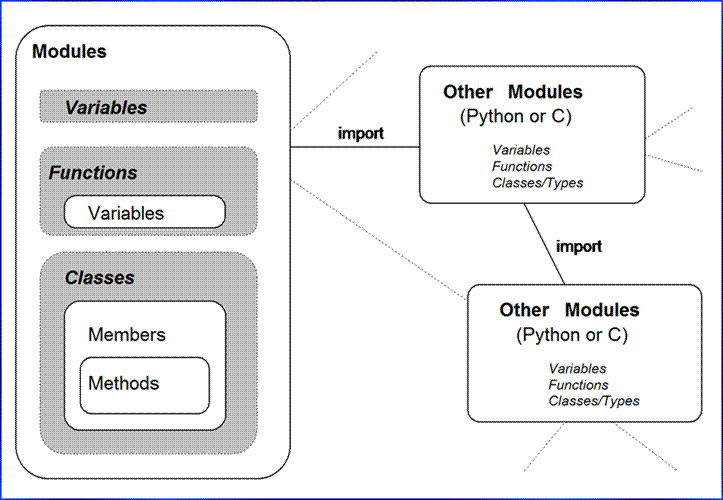
♦ System name-space partitioning
♦ Implementing shared services or data
Module topics
♦ The basics
♦ Import variations
♦ Reloading modules
♦ Design concepts
♦ Modules are objects
♦ Package imports
♦ Odds and ends
♦ Module gotchas
Module
basics
♦ Creating modules: Python files, C extensions; Java classes (Jython)
♦ Using modules: import, from, reload(), 3.X: imp.reload()
♦ Module search path: $PYTHONPATH
file: module1.py
def printer(x): # module attribute
print x
Module usage
% python
>>> import module1 # get module
>>> module1.printer('Hello world!')
Hello world!
>>> from module1 import printer # get an export
>>> printer('Hello world!')
>>> from module1 import * # get all exports
>>> printer('Hello world!')
“from *” can obscure variables’ meaning
>>> from module1 import * # may overwrite my names
>>> from module2 import * # no way to tell what we get
>>> from module3 import *
>>> . . .
>>> func() # ← ?!
# Advice: use “from *” with at most 1 module per file
“from” does not play well with “reload”
>>> from module1 import func # copy variable out
>>> func() # test it
…change module1.py…
>>> from imp import reload # required in 3.X
>>> reload(module1) # ← FAILS: unbound name!
>>> import module1 # must bind name here
>>> reload(module1) # ok: loads new code
>>> func() # ← FAILS: old object!
>>> module1.func() # this works now
>>> from module1 import func # so does this
>>> func()
# Advice: don’t do that--run scripts other ways
Module
files are a namespace
♦ A single scope: local==global
♦ Module statements run on first import
♦ Top-level assignments create module attributes
♦ Module namespace: attribute ‘__dict__’, or dir()
file: module2.py
print 'starting to load...'
import sys
name = 42
def func(): pass
class klass: pass
print 'done loading.'
Usage
>>> import module2
starting to load...
done loading.
>>> module2.sys
<module 'sys'>
>>> module2.name
42
>>> module2.func, module2.klass
(<function func at 765f20>, <class klass at 76df60>)
>>> module2.__dict__.keys() # add list() in 3.X
['__file__', 'name', '__name__', 'sys', '__doc__', '__builtins__', 'klass', 'func']
Name
qualification
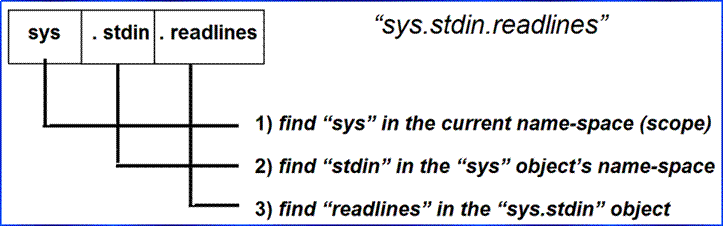
♦ Simple variables
● ‘X’ searches for name ‘X’ in current scopes
♦ Qualification
● ‘X.Y’ searches for attribute ‘Y’ in object ‘X’
♦ Paths
● ‘X.Y.Z’ gives a path of objects to be searched
♦ Generality
● Qualification works on all objects with attributes: modules, classes, built-in types, etc.
Import
variants
♦ Module import model
● module loaded and run on first import or from
● running a module’s code creates its top-level names
● later import/from fetches already-loaded module
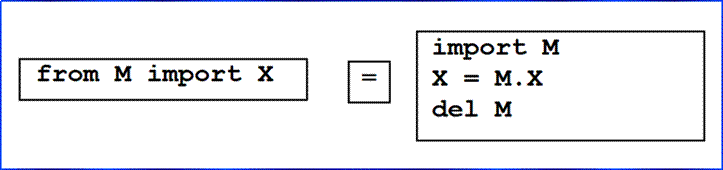
♦ import and from are assignments
● import assigns an entire module object to a name
● from assigns selected module attributes to names
|
Operation |
Interpretation |
|
import
mod |
fetch
a module as a whole |
|
from
mod import name |
fetch
a specific name from a module |
|
from
mod import * |
fetch
all top-level names from a module |
|
imp.reload(mod) |
force
a reload of module’s code |
Reloading
modules
♦ Imports only load/run module code first time
♦ Later imports use already-loaded module
♦ reload function forces module code reload/rerun
♦ Allows programs to be changed without stopping
♦ 3.X: must first “from imp import reload” to use!
General form
import module # initial import
[use module.attributes]
... # change module file
...
from imp import reload # required in 3.X
reload(module) # get updated exports
[use module.attributes]
Usage details
♦ A function, not a statement
♦ Requires a module object, not a name
♦ Changes a module object in-place:
● runs module file’s new code in current namespace
● assignments replace top-level names with new values
● impacts all clients that use ‘import’ to fetch module
● impacts future ‘from’ clients (see earlier example)
Reload example (optional section)
♦ Changes and reload file without stopping Python
♦ Other common uses: GUI callbacks, embedded code, etc.
% cat changer.py
message = "First version"
def printer():
print message
% python
>>> import changer
>>> changer.printer()
First version
>>>
[modify changer.py without stopping python]
% vi changer.py
% cat changer.py
message = "After editing"
def printer():
print 'reloaded:', message
[back to the python interpreter/program]
>>> import changer
>>> changer.printer() # no effect: uses loaded module
First version
>>> reload(changer) # forces new code to load/run
<module 'changer'>
>>> changer.printer()
reloaded: After editing
Package imports
Module package imports name directory paths:
♦ Module name → “dir.dir.dir…” in import statements and reloads
● “import dir1.dir2.mod” → loads dir1\dir2\mod.py
● “from dir1.dir2.mod import name”
♦ dir1 must be contained by a directory on sys.path (‘.’, PYTHONPATH, etc.)
♦ Each dir must have “__init__.py” file, possibly empty (till 3.3: optional)
♦ __init__.py gives directory’s namespace, can use __all__ for “from*”
♦ Simplifies path, disambiguates same-named modules files
Example
For:
dir0\dir1\dir2\mod.py
And:
import dir1.dir2.mod
● dir0 (container) must be listed on the module search path
● dir1 and dir2 both must contain an __init__.py file
● dir0 does not require an __init__.py
dir0\
dir1\
__init__.py
dir2\
__init__.py
mod.py
Why packages?
root\
sys1\
__init__.py (__init__ needed if dir in import)
util.py
main.py (“import util” finds here)
other.py
sys2\
__init__.py
util.py
main.py
other.py
sys3\ (here or elsewhere)
__init__.py (your new code here)
myfile.py (“import util” depends on path)
(“import sys1.util” doesn’t)
Advanced: Relative import syntax (2.5+)
To enable in
2.X (standard in 3.X):
from __future__
import absolute_import # till 2.7, “from” stmt
only
In code located in package folder pkg:
import string # skips pkg:
finds the standard library's version
from .string
import name1, name2 # import names from
pkg.string only
from . import string
# import pkg.string
Advanced: Namespace packages (3.3+)
Extension to
usual import algorithm: directories without __init__.py, located anywhere on
path, checked for last, and used only if no normal module or package found at
level: concatenation of all found becomes a virtual package for deeper
imports. Not yet used much in practice.
See Learning Python 5th
Edition for more advanced package details.
Odds and
ends
♦ Python 2.0+: “import module as name”
● Like “import module” + “name = module”
● Also good for packages: “import sys1.util as util”
♦ Loading modules by name string
● exec(‘import ‘ + name)
● __import__(name)
♦ Modules are compiled to byte code on first import
● ‘.pyc’ files serve as recompile dependency
● compilation is automatic and hidden
♦ Data hiding is a convention
● Exports all names defined at the top-level of a module
● Special case: __all__ list gives names exported by “from *”
● Special case: “_X” names aren’t imported by a “from*”
♦ The __name__ == ‘__main__’ trick
● __name__ auto set to ‘__main__’ only when run as script
● allows modules to be imported and/or run
● Simplest unit test protocol, dual usage modes for code
file: runme.py
def tester():
print "It's Christmas in Heaven"
if __name__ == '__main__': # only when run
tester() # not when imported
Usage modes
% python
>>> import runme
>>> runme.tester()
It's Christmas in Heaven
% python runme.py
It's Christmas in Heaven
Module
design concepts
♦ Always in a module: interactive = module __main__
♦ Minimize module coupling: global variables
♦ Maximize module cohesion: unified purpose
♦ Modules should rarely change other module’s variables
mod.py
X = 99 # reader sees only this
import mod
print mod.X ** 2 # always okay to use
import mod
mod.X = 88 # almost always a Bad Idea!
import mod
result = mod.func(88) # better: isolates coupling
Modules
are objects: metaprograms
♦ A module which lists namespaces of other modules
♦ Special attributes: module.__name__, __file__, __dict__
♦ getattr(object, name) fetches attributes by string name
♦ Add to $PYTHONSTARTUP to preload automatically
File mydir.py
verbose = 1
def listing(module):
if verbose:
print "-"*30
print ("name: %s file: %s" %
(module.__name__, module.__file__))
print "-"*30
count = 0
for attr in module.__dict__.keys(): # scan names
print "%02d) %s" % (count, attr),
if attr[0:2] == "__":
print "<built-in name>" # skip specials
else:
print getattr(module, attr) #__dict__[attr]
count = count+1
if verbose:
print "-"*30
print module.__name__, "has %d names" % count
print "-"*30
if __name__ == "__main__":
import mydir
listing(mydir) # self-test code: list myself
♦ Running the module on itself
C:\python> python mydir.py
------------------------------
name: mydir file: mydir.py
------------------------------
00) __file__ <built-in name>
01) __name__ <built-in name>
02) listing <function listing at 885450>
03) __doc__ <built-in name>
04) __builtins__ <built-in name>
05) verbose 1
------------------------------
mydir has 6 names
------------------------------
Another program about programs
♦ ‘exec’ runs strings of Python code
♦ ‘os.system’ runs a system shell command
♦ __dict__ attribute is module namespace dictionary
♦ ‘sys.modules’ is the loaded-module dictionary
file: fixer.py
editor = 'vi' # your editor's name
def python(cmd):
import __main__
namespace = __main__.__dict__
exec cmd in namespace, namespace
# 3.X: exec(cmd, namespace, namespace)
def edit(filename):
import os
os.system(editor + ' ' + filename)
def fix(modname):
import sys # edit,(re)load
edit(modname + '.py')
if modname in sys.modules.keys():
python('reload(' + modname + ')')
else:
python('import ' + modname)
% python
>>> from fixer import fix
>>> fix("spam") # browse/edit, import by name
>>> spam.function() # spam was imported in __main__
>>> fix("spam") # edit and reload() by name
>>> spam.function() # test new version of function
Module
gotchas
“from” copies names but doesn’t link
nested1.py
X = 99
def printer(): print X
nested2.py
from nested1 import X, printer # copy names out
X = 88 # changes my "X" only!
printer()
nested3.py
import nested1 # get module as a whole
nested1.X = 88 # change nested1's X
nested1.printer()
% python nested2.py
99
% python nested3.py
88
Statement order matters at top-level
♦ Solution: put most immediate code at bottom of file
file: order1.py
func1() # error: "func1" not yet assigned
def func1():
print func2() # okay: "func2" looked up later
func1() # error: "func2" not yet assihned
def func2():
return "Hello"
func1() # okay: "func1" and "func2" assigned
Recursive “from” import gotchas
♦ Solution: use “import”, or “from” inside functions
file: recur1.py
X = 1
import recur2 # run recur2 now if doesn't exist
Y = 2
file recur2.py
from recur1 import X # okay: "X" already assigned
from recur1 import Y # error: "Y" not yet assigned
>>> import recur1
Traceback (innermost last):
File "<stdin>", line 1, in ?
File "recur1.py", line 2, in ?
import recur2
File "recur2.py", line 2, in ?
from recur1 import Y # error: "Y" not yet assigned
ImportError: cannot import name Y
“reload” may not impact “from” imports
♦ “reload” overwrites existing module object
♦ But “from” names have no link back to module
♦ Use “import” to make reloads more effective
import module Þ module.X reflects module reloads
from module import X Þ X may not reflect module reloads!
“reload” isn’t applied transitively
♦ Use multiple “reloads” to update subcomponents
♦ Or use recursion to traverse import dependencies
See CD’s Extras\Code\Misc\reloadall.py
Optional
reading: a shared stack module
♦ Manages a local stack, initialized on first import
♦ All importers share the same stack: single instance
♦ Stack accessed through exported functions
♦ Stack can hold any kind of object (heterogeneous)
file: stack1.py
stack = [] # on first import
error = 'stack1.error' # local exceptions
def push(obj):
global stack # 'global' to change
stack = [obj] + stack # add item to front
def pop():
global stack
if not stack:
raise error, 'stack underflow' # raise local error
top, stack = stack[0], stack[1:] # remove front item
return top
def top():
if not stack: # raise local error
raise error, 'stack underflow' # or let IndexError
return stack[0]
def empty(): return not stack # is the stack []?
def member(obj): return obj in stack # item in stack?
def item(offset): return stack[offset] # index the stack
def length(): return len(stack) # number entries
def dump(): print '<Stack:%s>' % stack
Using the stack module
% python
>>> import stack1
>>> for i in range(5): stack1.push(i)
...
>>> stack1.dump()
<Stack:[4, 3, 2, 1, 0]>
Sequence-like tools
>>> stack1.item(0), stack1.item(-1), stack1.length()
(4, 0, 5)
>>> stack1.pop(), stack1.top()
(4, 3)
>>> stack1.member(4), stack1.member(3)
(0, 1)
>>> for i in range(stack1.length()): print stack1.item(i),
...
3 2 1 0
Exceptions
>>> while not stack1.empty(): x = stack1.pop(),
...
>>> try:
... stack1.pop()
... except stack1.error, message:
... print message
...
stack underflow
Module clients
file: client1.py
from stack1 import *
push(123) # module-name not needed
result = pop()
file: client2.py
import stack1
if not stack1.empty(): # qualify by module name
x = stack1.pop()
stack1.push(1.23) # both clients share same stack
Lab Session 5
Click here to go to
lab exercises
Click here to go to
exercise solutions
Click here to go to
solution source files
Click here to go to
lecture example files