ToaruOS is a complete, independent operating system for x86-64 PCs and ARMv8 VM environments.
The OS includes an SMP-capable modular kernel, C standard library with dynamic linker, a composited desktop environment, a dynamic bytecode-compiled programming language, advanced code editor, and a rapidly expanding collection of POSIX utilities, all of which is original to the project and has no third-party dependencies.
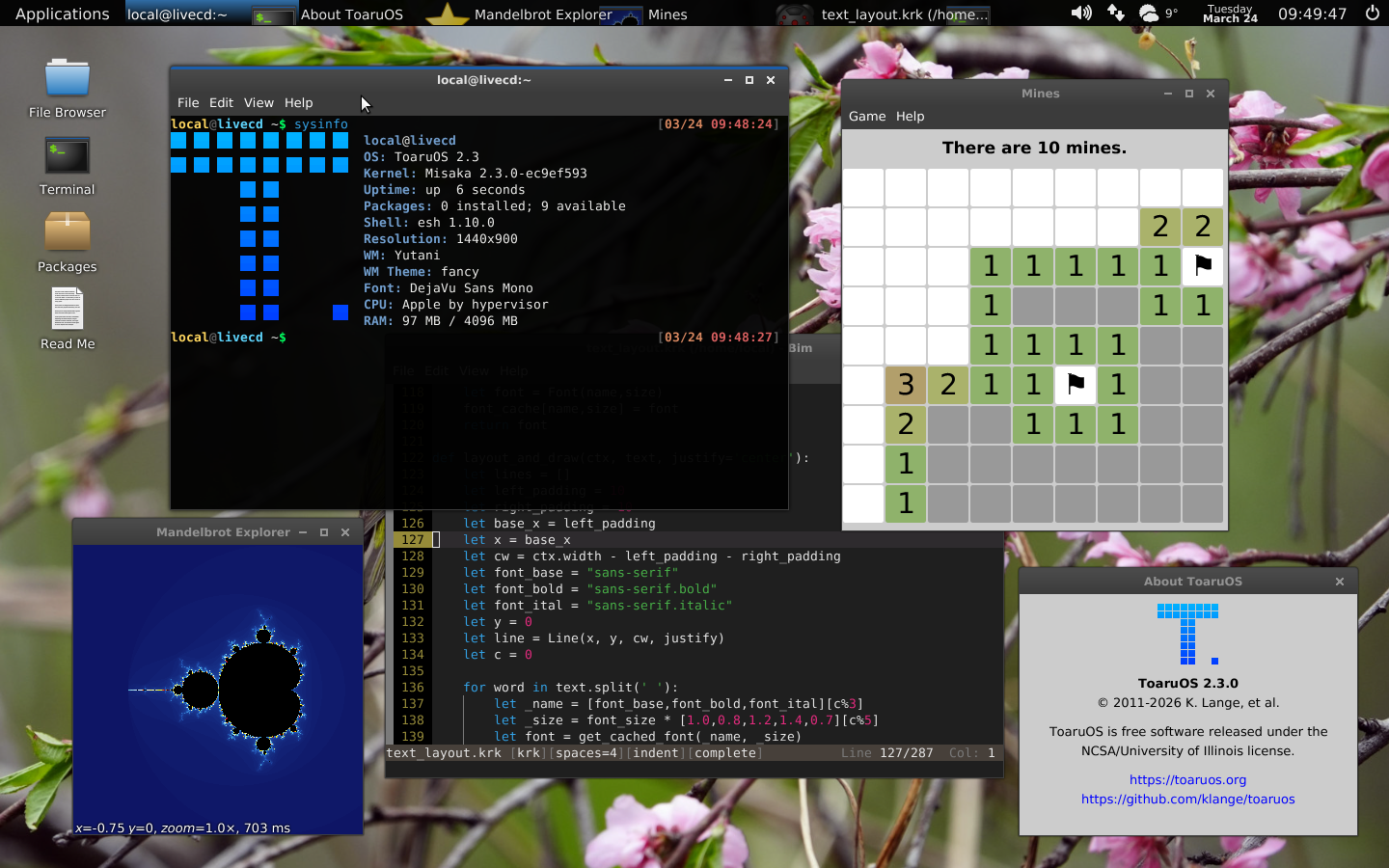
ToaruOS has been in development since January of 2011. The first full version was released in 2017.
Early versions of ToaruOS relied on a large suite of ports. In 2018, a project was started to replace all third-party runtime dependencies of the OS, culminating in the release of ToaruOS 1.6. It would take a few more years for functionality to reach full parity with the original release.
ToaruOS's kernel was rewritten in 2020 and 2021, and ported to x86-64, with support for SMP. ToaruOS 2.0 was released in December of 2021.
In early 2022, the OS was further ported to aarch64.
- Misaka (kernel), kernel/, a hybrid modular kernel, and the core of the operating system.
- Yutani (window compositor), apps/compositor.c, manages window buffers, layout, and input routing.
- Kuroko (interpreter), kuroko/, a dynamic bytecode-compiled programming language.
- Bim (text editor), bim/, is a Vim-inspired editor with syntax highlighting.
- Terminal, apps/terminal.c, xterm-esque terminal emulator with 24-bit color support.
- ld.so (dynamic linker/loader), libc/dlfcn/dl.c, loads dynamically-linked ELF binaries.
The following projects are currently in progress:
- Improve POSIX coverage especially with new utilities, and more correct file system behavior.
- Continue to improve the C library which remains quite incomplete.
- Replace third-party development tools to get the OS to a state where it is self-hosting with just the addition of a C compiler.
General users hoping to build ToaruOS from source are recommended to fork the repository on Github and make use of the Github CI pipeline.
For those looking to build locally on an appropriately configured Linux host with Docker, a build container is available. The ToaruOS repository should be used as a bind mount at /root/misaka and util/build-in-docker.sh can be run within this container to complete the compilation process:
git clone https://github.com/klange/toaruos
cd toaruos
git submodule update --init kuroko
git submodule update --init bim
docker pull toaruos/build-tools:1.99.x
docker run -v `pwd`:/root/misaka -w /root/misaka -e LANG=C.UTF-8 -t toaruos/build-tools:1.99.x util/build-in-docker.sh
After building like this, you can run the various utility targets (make run, etc.). Try make shell to run a ToaruOS shell using a serial port with QEMU.
The Makefile uses a Kuroko tool, auto-dep.krk, to generate additional Makefiles for the userspace applications and libraries, automatically resolving dependencies based on #include directives.
In an indeterminate order, the C library, kernel, userspace librares and applications are built, combined into a compressed archive for use as a ramdisk, and then packaged into an ISO9660 filesystem image.
- apps - Userspace applications, all first-party.
- base - Ramdisk root filesystem staging directory. Includes C headers in
base/usr/include, as well as graphical resources for the compositor and window decorator. - bim - Submodule checkout of the Bim editor.
- boot - BIOS and EFI loader with interactive menus.
- build - Auxiliary build scripts for platform ports.
- kernel - The Misaka kernel.
- kuroko - Submodule checkout of the Kuroko interpreter.
- lib - Userspace libraries.
- libc - C standard library implementation.
- linker - Userspace dynamic linker/loader, implements shared library support.
- modules - Loadable driver modules for the kernel.
- tests - Test utilities that are not normally built.
- util - Utility scripts, staging directory for the toolchain (binutils/gcc).
- .make - Generated Makefiles.
The root filesystem is set up as follows:
bin: First-party applications.cdrom: Mount point for the CD, if available.dev: Virtual device directory, generated by the kernel.net: Network interface devices.pex: Packet Exchange hub, lists accessible IPC services.pts: PTY secondaries, endpoints for TTYs.
etc: Configuration files, startup scripts.home: User directories.lib: First-party librarieskuroko: Kuroko modules.
mod: Loadable kernel modules.proc: Virtual files that present kernel state.1, etc.: Virtual files with status information for individual processes.
src: Source files, see "Project Layout" section above.tmp: Mounted as a read/write tmpfs normally.usr: Userspace resourcesbin: Third-party applications, normally empty until packages are installed.include: Header files, including potentially ones from third-party packages.lib: Third-party libraries. Should havelibgcc_s.soby default.share: Various resources.bim: Syntax highlighting and themes for the text editor.cursor: Mouse cursor sprites.fonts: TrueType font files. Live CDs ship with Deja Vu Sans.games: Dumping ground for game-related resource files, like Doom wads.help: Documentation files for the Help Browser application.icons: PNG icons, divided into further directories by size.ttk: Spritesheet resources for the window decorator and widget library.wallpapers: JPEG wallpapers.
var: Runtime files, including package manager manifest cache, PID files, some lock files, etc.
The best end-user experience with ToaruOS will be had in either of these virtual machines, as ToaruOS has support for their automatic display sizing and absolute mouse positioning.
Set up a new VM for an "other" 64-bit guest, supply it with at least 1GiB of RAM, attach the CD image, remove or ignore any hard disks, and select an Intel Gigabit NIC. Two or more CPUs are recommended, as well.
By default, the bootloader will pass a flag to the VirtualBox device driver to disable "Seamless" support as the implementation has a performance overhead. To enable Seamless mode, use the bootloader menu to check the "VirtualBox Seamless" option before booting. The menu also has options to disable automatic guest display sizing if you experience issues with this feature.
Most development of ToaruOS happens in QEMU, as it provides the most flexibility in hardware and the best debugging experience. A recommended QEMU command line in an Ubuntu 20.04 host is:
qemu-system-x86_64 -enable-kvm -m 1G -device AC97 -cdrom image.iso -smp 2
Replace -enable-kvm with -accel hvm or -accel haxm as appropriate on host platforms without KVM, or remove it to try under QEMU's TCG software emulation.
Note that QEMU command line options are not stable and these flags may produce warnings in newer versions.
The option -M q35 will replace the PIIX chipset emulation with a newer one, which has the side effect of switching the IDE controller for a SATA one. This can result in faster boot times at the expense of ToaruOS not being able to read its own CD at runtime until I get around to finishing my AHCI driver.
ToaruOS has been successfully tested on real hardware. If the native BIOS or EFI loaders fail to function, try booting with Grub. ToaruOS complies with the "Multiboot" and "Multiboot 2" specs so it may be loaded with either the multiboot or multiboot2 commands as follows:
multiboot2 /path/to/misaka-kernel root=/dev/ram0 migrate vid=auto start=live-session
module2 /path/to/ramdisk.igz
set gfxpayload=keep
All first-party parts of ToaruOS are made available under the terms of the University of Illinois / NCSA License, which is a BSD-style permissive license. Unless otherwise specified, this is the original and only license for all files in this repository - just because a file does not have a copyright header does not mean it isn't under this license. ToaruOS is intended as an educational reference, and I encourage the use of my code, but please be sure you follow the requirements of the license. You may redistribute code under the NCSA license, as well as make modifications to the code and sublicense it under other terms (such as the GPL, or a proprietary license), but you must always include the copyright notice specified in the license as well as make the full text of the license (it's only a couple paragraphs) available to end-users.
While most of ToaruOS is written entirely by myself, be sure to include other authors where relevant, such as with Mike's audio subsystem or Dale's string functions.
Some components of ToaruOS, such as Kuroko or bim have different but compatible terms.
ToaruOS is regularly mirrored to multiple Git hosting sites.
- Gitlab: toaruos/toaruos
- GitHub: klange/toaruos
- Bitbucket: klange/toaruos
- ToaruOS.org: klange/toaruos
The kernel and all userspace libraries and applications native to the operating system can be built from within it if a compiler toolchain is installed, however ToaruOS is not generally capable of building GCC or binutils, and some build-time components used to create ramdisks and CD images are not currently available.
No. ToaruOS is a completely independent project, and all code in this repository - which is the entire codebase of the operating system, including its kernel, bootloaders, libraries, and applications - is original, written by myself and a handful of contributors over the course of ten years. The complete source history, going back to when ToaruOS was nothing more than a baremetal "hello world" can be tracked through this git repository.
POSIX coverage remains very incomplete.
ToaruOS is a personal project, not a community project. Contributions in the form of code should be discussed in advance. Ports and other work outside of the repo, however, are a great way to help out.