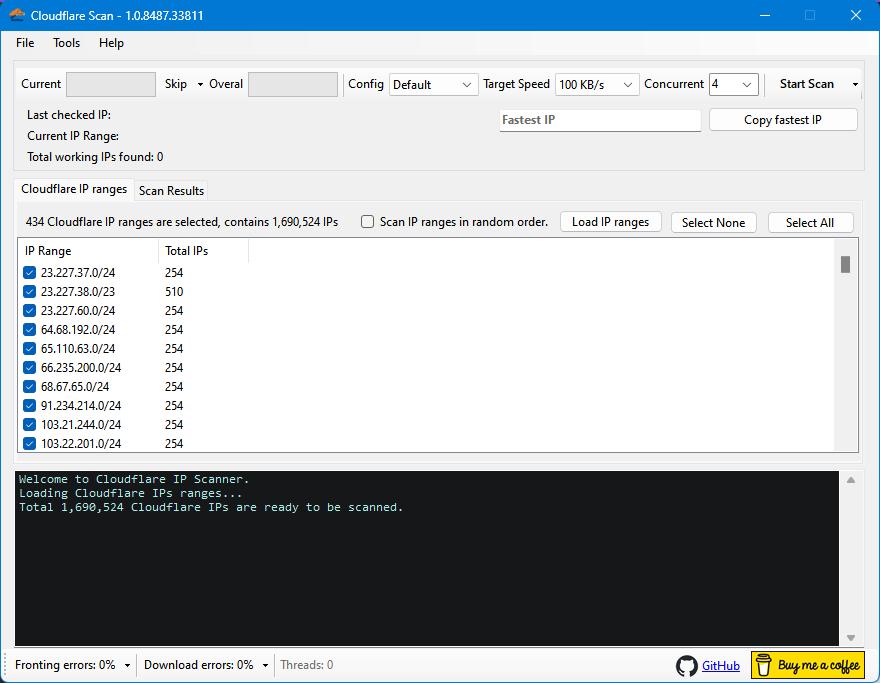
This powerful tool help you to scan all IP ranges of Cloudflare to find clean and working ones.
- Scan all Cloudflare IP ranges and find fastest IP addresses.
- Ability to scan with your own custom v2ray config.
- Save scan results and ability to scan in previous results.
- Includes rich options like setting Target speed, Download timeout, Random scan.
- Average speed test, Auto skips, Self diagnose, Auto update, Import/Export, etc.
- Fast and concurrent scan.
- Selectable IP ranges and ability to skip current IP range.
- User friendly and easy to use and includes some accessibility features for blind people.
To run this app you need to have .NET Desktop Runtime 6 installed on your Windows which is normally installed on newer versions of Windows.
However if you don't already have it installed on your PC then you can download it from here:
Look for .NET Desktop Runtime 6 in download page:
https://dotnet.microsoft.com/en-us/download/dotnet/6.0
Or use this direct links:
For 64 bit Windows:
https://dotnet.microsoft.com/en-us/download/dotnet/thank-you/runtime-desktop-6.0.14-windows-x64-installer
For 32 bit Windows:
https://dotnet.microsoft.com/en-us/download/dotnet/thank-you/runtime-desktop-6.0.14-windows-x86-installer
Just download latest release from Releases section and extract zip file to disk, then run WinCFScan.exe.
- In
Scan Resultstab you can right click on an IP and Copy IP address and also you can click onTest this IP addressmenu to test just one IP address.
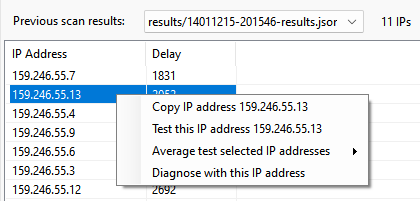
- Average speed test and diagnose with current IP is available here too.
- Here also you can load saved previous results and scan only on those IPs by clicking on
Scan in resultsbutton. - You can set number of concurrent scan process to speed up your scan but be careful about using large values. Set it base on your CPU threads and also your connection speed. High number of concurrent processes might lead to scan timeout and loose some of working IPs.
How to add custom configs to the app.
How to diagnose scan problems.
Only advanced users:
If you want to build and compile it yourself then download source code to your PC and then open WinCFScan.sln file in Visual Studio 2022.
Then you can build it from the Build menu. After that you must copy content of assets folder into executable folder which usually is something like bin/Debug/net6.0-windows.
This app is provided as is, and we make no warranties or guarantees about its performance or suitability for your specific needs. Use at your own risk.
Have fun and give us feedback.